Last updated: . Every code sample on this page was run against the live API with the sandbox key on that date.
Short answer: Rendlet gives you two ways to turn invoice data into a PDF with one HTTP call: (A) send JSON to the built-in invoice template, with no HTML to write, or (B) fill your own HTML invoice template and send the HTML. Both use POST https://rendlet.com/v1/pdf.
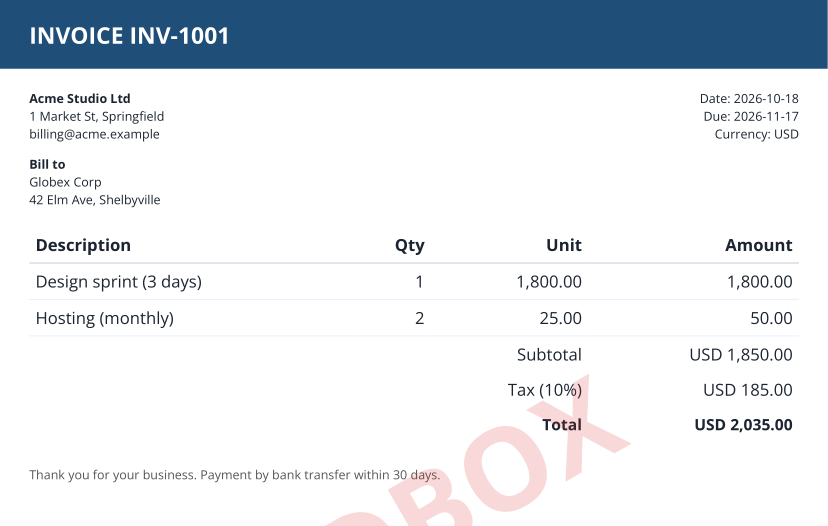
The sample above, as a PDF: invoice-sample.pdf. Sandbox renders also carry a faint SANDBOX watermark.
/v1/pdf; the response body is the PDF (or base64 JSON with "response":"base64").Fields: number, date, due, currency, accent (hex colour), seller {name, address, email}, buyer {name, address}, items [{description, qty, unit_price}], tax_rate (e.g. 0.1) and notes. Rendlet computes line amounts, subtotal, tax and total. GET /v1/templates returns this example and an itinerary template; no key needed. Template mode doesn't launch a browser, and it supports Simplified Chinese text.
Save as invoice.mjs and run node invoice.mjs (Node 18+):
// Node 18+. Invoice from JSON data with the built-in "invoice" template (no HTML needed).
// Save as invoice.mjs and run: node invoice.mjs
import { writeFile } from "node:fs/promises";

const invoice = {
  template: "invoice",
  data: {
    number: "INV-1001",
    date: "2026-10-18",
    due: "2026-11-17",
    currency: "USD",
    accent: "#1f4e79",
    seller: { name: "Acme Studio Ltd", address: "1 Market St, Springfield", email: "billing@acme.example" },
    buyer: { name: "Globex Corp", address: "42 Elm Ave, Shelbyville" },
    items: [
      { description: "Design sprint (3 days)", qty: 1, unit_price: 1800 },
      { description: "Hosting (monthly)", qty: 2, unit_price: 25 },
    ],
    tax_rate: 0.1,
    notes: "Thank you for your business. Payment by bank transfer within 30 days.",
  },
  filename: "INV-1001.pdf",
};

const res = await fetch("https://rendlet.com/v1/pdf", {
  method: "POST",
  headers: {
    Authorization: `Bearer ${process.env.RENDLET_API_KEY ?? "sandbox"}`,
    "Content-Type": "application/json",
  },
  body: JSON.stringify(invoice),
});
if (!res.ok) throw new Error(`Rendlet ${res.status}: ${await res.text()}`);
await writeFile("INV-1001.pdf", Buffer.from(await res.arrayBuffer()));
console.log("saved INV-1001.pdf;", res.headers.get("x-quota-remaining"), "renders left");If you need your own layout or branding, render your HTML template with your data (your usual template engine), then send the HTML. Our real sample request is at /samples/invoice-sample-request.json: a self-contained HTML invoice with inline CSS, options of {"format":"A4","margin":"0"} (the design has its own padding) and a filename. Render it with curl:
# Download the sample request, then render it (sandbox key works as-is)
curl -sO https://rendlet.com/samples/invoice-sample-request.json
curl -X POST https://rendlet.com/v1/pdf \
  -H "Authorization: Bearer ${RENDLET_API_KEY:-sandbox}" \
  -H "Content-Type: application/json" \
  -d @invoice-sample-request.json \
  -o sample-invoice.pdf
When we ran it the response was 200, content-type: application/pdf, x-pages: 1. The Node and Python versions of this call are in the Node.js guide and the Python guide.
<style> tag. JavaScript is not run, so build tables and totals before you send the HTML.https:// URLs or embed them as data: URIs; other URLs are not fetched.options.printBackground: true if your design relies on background colours.filename (e.g. INV-1001.pdf) so downloads get a sensible name.| Sandbox | Free | Starter | Pro | Scale | |
|---|---|---|---|---|---|
| Price | $0 | $0 | $7/mo | $19/mo | $59/mo |
| Documents | 5 / day / network | 100 / month | 1,000 / month | 5,000 / month | 25,000 / month |
| Requests per minute | 3 | 10 | 30 | 60 | 120 |
| Pages per document | 1 | 10 | 50 | 200 | 500 |
| HTML size | 50 KB | 1 MB | 2 MB | 2 MB | 2 MB |
Every plan has a hard monthly cap: at the cap the API returns 429 with an upgrade_url, and you are never billed for overage. Failed renders don't count. Source: docs.
Successful renders return X-Pages, X-Plan, X-Quota-Limit and X-Quota-Remaining. Errors are JSON like {"error":"...","message":"..."}: 400 bad request, 401 missing key, 403 invalid key, 413 HTML too large or too many pages, 429 quota exceeded, 500 render failed.